How to Automate Social Media Posts and Reclaim Your Time
SynthAI Team
Content Team
Let's be honest, knowing how to automate social media posts isn't some dark art. It's simply about using the right tools to schedule your content in advance. This one change frees you from the daily pressure of manual posting and turns your social media from a reactive chore into a proactive marketing machine that runs 24/7.
Why Social Media Automation Is No Longer Optional
If you've ever felt that sinking feeling staring at a blank content calendar, you get it. For most business owners and marketing teams, social media management feels like a hamster wheel—you're always running, but never really getting ahead.
A typical week can easily swallow over ten hours just brainstorming, creating, and then manually uploading posts across different platforms. That’s a huge time sink that could be invested in high-level strategy or actually talking to your customers.
This is exactly why automation isn't just a "nice-to-have" anymore. It's a strategic necessity. It's not about being lazy; it's about being efficient.
Get Your Most Valuable Asset Back: Time
The biggest, most immediate win from automating your social media is the staggering amount of time you reclaim. Instead of bouncing between five different apps every single day, you can sit down and batch-create an entire week's—or even a month's—worth of content in a single focused session.
This lets you finally step off the content treadmill and focus on the things that actually move the needle.
Just think about cutting your social media workload by a massive 70%. That could mean getting 30-40 hours back every month—literally a full workweek you can now use for something else. It's not an exaggeration; companies trying to manually juggle 4-5 platforms often burn through 40+ hours a month just on posting and basic engagement.
It’s no wonder 83% of marketing departments are already automating their posts. In fact, 49% of decision-makers now consider social media automation their standard operating procedure. If you want to dive deeper, these social media automation statistics clearly show it's the new benchmark for efficiency.
Tools like Buffer provide a central dashboard where you can see your entire strategy at a glance, like in the screenshot below.
This single view—where you can queue up posts, check performance, and manage conversations—is the very foundation of an efficient, automated system.
Beyond Time Savings: The Strategic Edge
Getting your schedule back is a game-changer, but that's just the start. Automating your posts unlocks some serious strategic advantages that you just can't get with manual management.
- Rock-Solid Consistency: An automated schedule means you're always on, even when you're off. That constant presence builds trust with your audience and keeps your brand front and center.
- Better Content, Less Stress: When you aren't scrambling to post something right now, you have the headspace to be more creative. Batching content leads to more thoughtful, higher-quality work.
- Smarter, Data-Backed Decisions: Automation tools come with built-in analytics. You can finally stop guessing and see exactly what's resonating with your audience by tracking engagement, reach, and clicks to fine-tune your approach.
> A lot of people worry that automation removes the human touch. It’s actually the opposite. By automating the repetitive tasks, you free up your time for genuine conversations, creative brainstorming, and strategic planning—the stuff that actually builds a brand. You get to graduate from being a social media operator to a social media strategist.
The difference becomes crystal clear when you compare the two approaches side-by-side.
Manual Vs Automated Social Media Management
Here’s a quick breakdown of how much time and effort you can expect to spend on common social media tasks, with and without automation. The contrast is pretty stark.
| Task | Manual Effort (Per Week) | Automated Effort (Per Week) |
|---|---|---|
| Content Creation | 4-6 Hours | 2-3 Hours (Batched) |
| Scheduling & Publishing | 3-5 Hours | 1 Hour (Set it and forget it) |
| Community Engagement | 2-4 Hours | 2-4 Hours (More focused time) |
| Performance Reporting | 1-2 Hours | 30 Minutes (Automated reports) |
| Total Time | 10-17 Hours | 5.5 - 8.5 Hours |
As you can see, automation doesn't eliminate the work, but it dramatically reduces the time spent on low-impact, repetitive tasks. This frees up your team to focus on high-value activities like community building and strategic analysis.
Building Your Automated Content Engine
Making the jump from manual posting to an automated system is about more than just picking a scheduling tool. It's about building a sustainable content pipeline—an engine that consistently turns your raw ideas into polished, scheduled posts without all the friction. The goal here is a system that truly works for you, not one that demands you babysit it every day.
The first move is choosing your foundation. For some people, a straightforward scheduler like Buffer or Later is the perfect starting point. For others, a more powerful platform that brings in AI, such as SynthAI, can do more than just schedule; it can help generate the content itself and tie your social media work directly to bigger business goals.
This flowchart lays out the old-school, manual process. It’s simple, but man, is it a time sink.
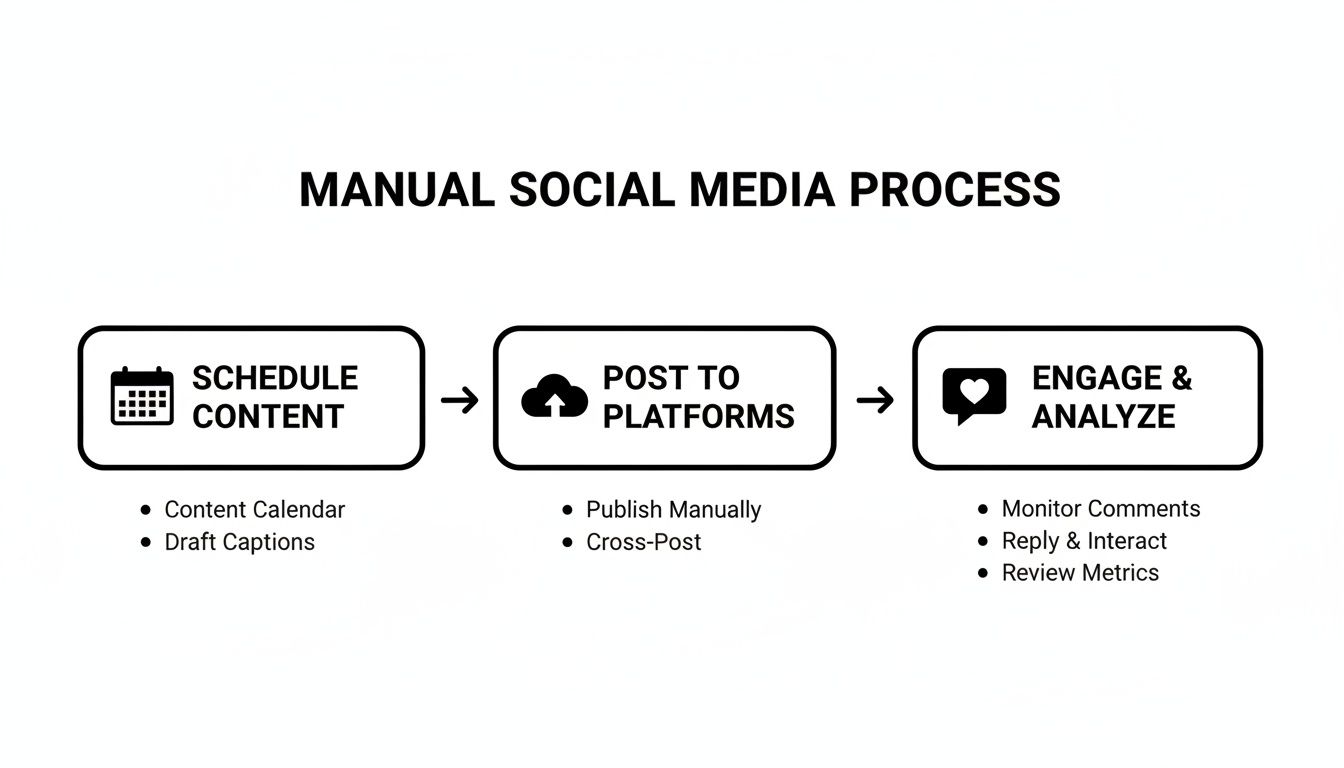
Every single one of those manual steps is a bottleneck. A solid automation engine is designed to blow right through them, giving you back hours for more important work.
Define Your Core Content Pillars
Before you can automate anything, you have to know what you're going to talk about day in and day out. Content pillars are the 3-5 core themes your brand will consistently own. These pillars are your North Star for content, making sure every single post feels relevant and reinforces who you are.
Think about a local coffee shop. Their pillars might look something like this:
- Menu & Specials: Drool-worthy shots of their food and drinks.
- Behind the Counter: Meet the baristas, see how the coffee is made.
- Community Vibes: Highlighting local events and partnerships.
- Coffee Know-How: Quick tips on brewing methods or latte art.
Once you have these pillars locked in, creating content gets so much easier. You stop asking "What should I post today?" and start asking, "Which pillar am I hitting today?" This structure is the bedrock of your content engine.
Create Versatile Post Templates
With your pillars established, it's time to build out some templates. Templates aren't about being robotic or boring; they're about creating repeatable formats that you can quickly customize. This is a massive time-saver.
Let’s go back to that coffee shop. For their "Menu & Specials" pillar, they could create a super simple template:
1. The Visual: A killer photo or quick video of the special.
2. The Hook: A question to grab attention, like, "Need a midweek pick-me-up?"
3. The Deets: A short, tasty description of the item.
4. The Ask (CTA): A clear next step, like, "Available 'til 3 PM! Come grab one."
5. The Hashtags: A pre-saved block of relevant local and food tags.
Using this template, the daily special post goes from a 15-minute task to a 2-minute one. You just drop in the new photo and description, maybe tweak the hook, and you’re done. You can apply this same logic to all your pillars, building out a library for tips, testimonials, or event promos.
> The real magic of automation isn't just in the scheduling. It's in systematizing the creation process. When you define pillars and build templates, you eliminate the daily "what-to-post" headache and create a predictable workflow that produces great content every time.
Establish a Content Calendar Workflow
Pillars and templates are in place. The final piece is your workflow—the actual rhythm of getting content prepped and loaded into your scheduler. I've found that a simple batching system works wonders for most teams.
Here’s a practical workflow you can steal:
- Monthly Game Plan: At the beginning of the month, sit down and map out your big themes, promotions, or holidays that align with your content pillars.
- Weekly Batching Session: Block off a couple of hours every week—say, Monday morning—to write all your captions and gather your visuals for the week ahead.
- Load & Approve: Shovel all that great content into your automation tool. If you're on a team, this is the perfect time for a manager to give everything a final once-over before it's set to go live.
This "batching" approach is way more efficient than scrambling to create a post every single day. It lets you get into a creative zone and ensures your calendar is always packed. You're no longer just reacting; you're operating a reliable content engine that hums along smoothly in the background.
How to Use AI to Craft and Schedule Your Posts
Once you have your content engine running, it's time to bring in artificial intelligence to really kick things into high gear. This is where you graduate from basic scheduling to having AI handle the creative heavy lifting. The right tools can act as a tireless creative partner, seriously boosting both the quality and quantity of your output.
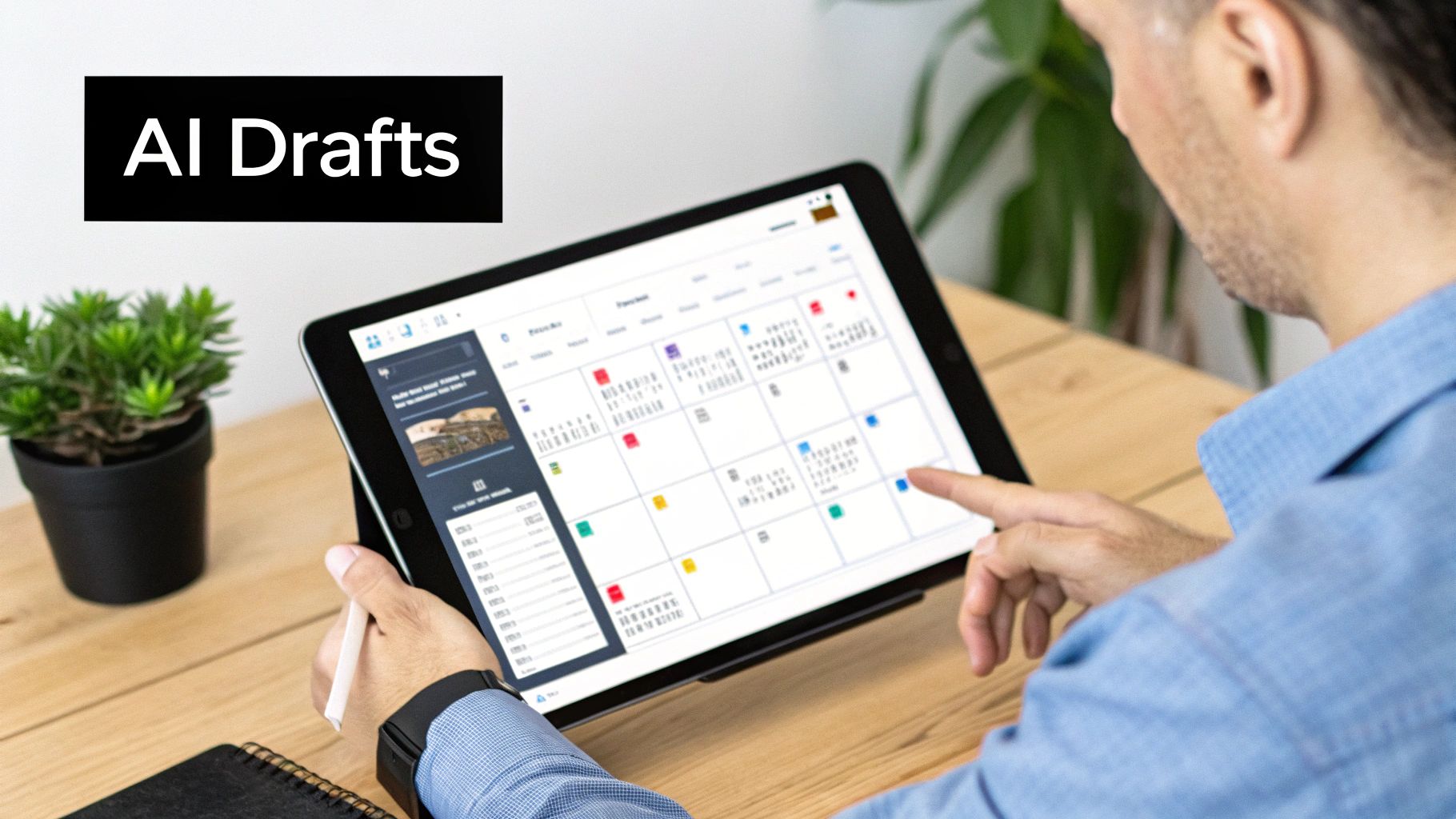
Think of AI as more than just a scheduler—it's a strategist. It can analyze trends, spitball ideas, and whip up drafts, turning what used to be a week's worth of content planning into something you can knock out in an afternoon.
From Blank Page to Full Calendar with AI
We've all been there: staring at an empty social media calendar, completely paralyzed. AI pretty much eliminates that feeling by becoming an endless source of ideas. Just feed it your core content pillars, your target audience, and your brand voice, and it can generate a month's worth of relevant post concepts in minutes.
Let's say you're a marketing manager for a SaaS company. Instead of burning hours in brainstorming meetings, you could ask an AI assistant like SynthAI's Echo to pull trending topics in your niche. Then, you can tell it to draft five LinkedIn posts about "productivity hacks for remote teams," complete with attention-grabbing hooks and relevant hashtags.
This AI-powered ideation isn't just about churning out content for the sake of it. It’s about being relevant. AI is incredibly good at figuring out what your audience is actually talking about right now, making sure your content lands at just the right time.
Generating Endless Post Variations
One of the quickest ways to kill engagement is by copy-pasting the same message across all your platforms. Every network has its own vibe and audience. AI makes it incredibly simple to create customized versions of one core idea so your content feels natural everywhere it appears.
For a single product announcement, an AI tool can instantly spin up:
- A professional, insightful version for LinkedIn that focuses on business benefits.
- A short, punchy, emoji-filled take for X (formerly Twitter).
- A longer, story-driven version for a Facebook post meant to start a conversation.
- Several benefit-oriented captions for an Instagram carousel.
> This isn't about making your content sound robotic; it's about efficient adaptation. You let AI handle the tedious task of rephrasing, which frees you up to focus on the big-picture strategy. You get to maintain a consistent brand message while respecting the unspoken rules of each platform.
The pros are already all over this. A recent survey found that a staggering 89.7% of social media professionals use AI daily or several times a week, with 71.1% pointing to time savings as the biggest win. Even better, 44.7% said their AI-assisted posts actually perform better than the ones they create from scratch. You can dig into more of these findings in the AI in social media marketing report to see how others are getting great results.
Crafting an Intelligent Scheduling Workflow
With a steady stream of AI-generated content ready to go, the last piece of the puzzle is a smart scheduling workflow. This is about more than just picking a time and hitting "schedule." Modern automation tools have features that can seriously extend your content's reach and lifespan.
First, figure out your ideal posting frequency. There's no single right answer, so start by digging into your analytics to see when your audience is most active. Use that data to set up a baseline schedule in your tool of choice.
Next, get familiar with content queues. Instead of scheduling every post by hand, you can drop your AI-generated content into categorized queues (like "Blog Promos" or "User Testimonials"). The tool will then automatically pull from these queues at your set times, which ensures you always have a balanced content mix without constant babysitting.
Finally, don't forget to set up evergreen post recycling. Some of your best stuff—like foundational guides or killer case studies—can deliver value for months or even years. You can configure your automation tool to automatically re-share this content every few months. This fills gaps in your calendar and drives traffic with zero extra effort, making sure your best content is always out there working for you.
Making Your Automation Strategy Work Smarter
Automating your social media posts is a great first step, but the real magic happens when you get those systems talking to the rest of your business. The goal is to break down the silos between your social media tool and other key platforms like Shopify, HubSpot, or WordPress. When they're connected, you create powerful workflows that do the heavy lifting for you.
Think about it: when a new product goes live in your Shopify store, an integration can automatically queue up a draft announcement post. Suddenly, your day-to-day business activities become a living, breathing content pipeline without you having to manually copy and paste a thing.
Connecting Your Tools for Seamless Workflows
For most businesses, the first and most impactful integration to set up is connecting your content management system (CMS) to your social scheduler. If you're running a blog or publishing any kind of regular content, this is non-negotiable.
Let's say you just published a deep-dive article on your WordPress blog. With a solid integration in place, hitting that "Publish" button sets off a chain reaction. Your automation tool immediately sees the new post and gets to work sharing it across your channels.
This is what that process looks like in the real world:
- The Trigger: Your new blog post is published.
- The Action: The scheduler grabs the new URL, headline, meta description, and featured image.
- The Result: A perfectly formatted post goes out on X, Facebook, and LinkedIn, sending a wave of initial traffic back to your new article.
Many platforms have this functionality baked right in. HubSpot, for example, can be configured to auto-publish new blog content to your social accounts about 15 minutes after the article goes live. It’s a simple connection that guarantees your best content gets immediate visibility.
> The point of integration isn't just to save a few clicks. It's about building a responsive marketing machine that keeps your social media perfectly in sync with your business. When everything is connected, your social presence instantly reflects new products, promotions, and content in near real-time.
Proving the Value: Are Your Automations Actually Working?
Setting up these smart workflows is one thing, but proving they’re actually delivering results is another. You have to move past vanity metrics and dig into the data that shows a real impact on your business goals.
Without clear reporting, you’re just guessing. You need to be able to draw a straight line from a specific automated post to a meaningful business outcome, like a sale or a lead. This is where a unified analytics dashboard becomes your best friend.
Key KPIs to Track for Automation ROI
To truly understand if your automated posts are paying off, focus on the metrics that show what your audience is doing.
| Metric Category | Key Performance Indicator (KPI) | Why It Matters |
|---|---|---|
| Engagement | Engagement Rate (Likes + Comments + Shares ÷ Followers) | This tells you if your content is actually hitting the mark with your audience. High engagement means you've found a good content-market fit. |
| Reach & Awareness | Click-Through Rate (CTR) | This shows how many people saw your post and were compelled enough to click the link. It's a direct measure of how persuasive your copy and creative are. |
| Conversion | Conversion Rate (e.g., Sign-ups, Purchases) | This is the bottom line. It tracks how many clicks from your social posts turned into a valuable action on your website, giving you clear proof of ROI. |
Tools like SynthAI can bring all this data together with its Vantage assistant, giving you a single source of truth. You can see exactly how a LinkedIn campaign influenced demo sign-ups or how an Instagram story drove sales for a new product. This is the kind of data-backed insight you need to confidently answer the question, "Is our social media strategy actually working?" and make smarter decisions to improve it.
Avoiding Common Automation Pitfalls
Automation is an incredible tool, but let's be clear: its job is to make your brand more consistent and present, not more robotic. When done right, it frees you up to have real, meaningful conversations. Get it wrong, and you can easily alienate the very audience you’re trying to build. Learning to automate social media posts effectively means knowing how to dodge the mistakes that can torpedo an otherwise solid strategy.
The single biggest trap is treating automation as a "set it and forget it" machine. The real magic happens when you find that sweet spot between machine efficiency and the irreplaceable human touch.
Don't Post the Same Message Everywhere
This one is a classic rookie mistake: blasting the exact same post across all your social channels. That data-heavy, professional caption you wrote for LinkedIn? It’s going to fall completely flat on Instagram, where visuals and storytelling are king. That quick, emoji-packed tweet will just look lazy and out of place on your company's Facebook page.
Every platform has its own culture, audience expectations, and content formats. Ignoring these unwritten rules makes your brand look like it just doesn't get it.
Instead, think of your core message as a starting point. Your job is to adapt it for each channel. This is where AI assistants, like SynthAI's Echo, can be a massive help. You can feed it a single idea and ask it to spin up multiple variations, each tailored to the specific tone and style of a different platform. That way, your content always feels native and thoughtful.
Avoid Automating All Your Engagement
I get it, the temptation to automate replies and comments to claw back even more time is strong. But this is a slippery slope. People can spot a canned, robotic response from a mile away, and it instantly destroys any sense of genuine connection. Engagement is the human part of social media; it’s where you actually build relationships.
So, how do you balance automated publishing with real interaction?
- Schedule Engagement Blocks: Carve out 15-20 minutes a few times a day to just be present. Manually reply to comments, answer DMs, and see what people are saying. Treat this time like a non-negotiable meeting.
- Focus on High-Value Conversations: You don’t have to reply to every single comment, but you should personally handle direct questions, detailed feedback, and any customer service issues.
- Listen for Trends: Use this manual check-in time to get a feel for the real-time conversations and trending topics. This is priceless feedback that a purely automated system will almost always miss.
> Automation should handle the monologue—the content you push out. But the dialogue—the back-and-forth conversations with your audience—must remain human. Protecting this distinction is the key to maintaining an authentic brand voice.
Implement an Approval Workflow
When you've got a team creating and scheduling content, things can get messy fast. Without a clear review process, you’re opening yourself up to off-brand messaging, embarrassing typos, or posts that completely miss the strategic mark. Think of an approval workflow as your safety net.
Most professional social media tools, including SynthAI, have approval features built right in. The process is usually straightforward: a team member drafts a post, and it gets added to a queue for a manager or editor to look over. They can then approve it, kick it back with feedback, or edit it directly before it gets scheduled.
This simple step is all about quality control. It protects your brand’s reputation and elevates your automation from a simple scheduler to a smart, strategic asset. It guarantees that even though the posting is automated, the strategy behind it is always intentional and human-approved.
Your Top Social Media Automation Questions, Answered
Jumping into social media automation for the first time? It's totally normal to have a few questions. You're putting a powerful tool in charge of your brand's voice, so it’s smart to be curious about how it all works, what it costs, and if it'll make you sound like a robot.
Let’s clear up the most common concerns I hear from people so you can get started with total confidence.
Will Automation Kill My Engagement?
This is the big one, right? And it’s a fair question. If you just "set it and forget it" with a stream of generic posts, then yes, your engagement will probably tank. Your audience can spot a robotic feed from a mile away.
But here’s the thing: when done right, automation actually boosts your engagement.
The secret is to automate the publishing, not the personality. Think of it this way: by scheduling your core content ahead of time, you free yourself up to be more human, not less. You'll have way more time to jump into real conversations, reply to comments with thoughtful answers, and actually listen to what your audience is talking about.
> Automation handles the monologue (your scheduled posts) so you can focus on the dialogue (the real-time conversations). The whole point is to be more present and responsive, and when your audience sees that, they're much more likely to engage.
How Much Is This Going to Cost Me?
The price for automation tools is all over the map, which is great because it means there's an option for literally every budget. Whether you're a one-person shop or a massive enterprise, you can find something that fits.
- Free & Freemium Plans: A lot of the big names like [Buffer](https://buffer.com/) or [Later](https://later.com/) have free tiers. They’re perfect for dipping your toes in the water, usually letting you connect a profile or two and schedule a handful of posts.
- Mid-Range Tools: For about $15 to $100 a month, you start unlocking the features that really save time. We're talking more accounts, unlimited scheduling, better analytics, and tools for working with a team.
- AI-Powered Platforms: Then you have more advanced systems like SynthAI that roll content creation, scheduling, and deep analytics into one. The pricing is different here, often based on how much you use it. The investment is higher, but the return comes from slashing the time you spend on content creation and getting smarter business insights.
The best way to think about it is as an investment, not a cost. If a $50/month tool saves you 10 hours of work, you’ve just paid yourself $5/hour to get that time back. Looked at that way, automation almost always pays for itself.
Which Social Platforms Are Best for This?
Honestly, you can automate posts on just about any major platform. The "best" one really just comes down to where your audience lives and what your goals are.
| Platform | What It's Great For | Things to Keep in Mind |
|---|---|---|
| X (Twitter) | High-frequency posts, quick news, and recycling evergreen content. | The feed moves so fast that automation is almost essential to stay visible. |
| Sharing your blog content, company updates, and promoting events. | Perfect for scheduling posts that drive people back to your website. | |
| Publishing articles, sharing industry news, and building your professional brand. | A must for B2B. Automation keeps you consistently top-of-mind with your network. | |
| Scheduling out your grid posts, carousels, and even Reels. | Visual planning tools are a game-changer here. Just know that APIs for Stories can still be a bit limited. | |
| Consistently pinning new products, blog post graphics, and inspiring visuals. | A goldmine for e-commerce. You can schedule a steady flow of visual content that links right back to your store. |
Platforms that demand a high volume of content, like X and Pinterest, get the biggest lift from automation. But let's be real—scheduling posts for any platform is a huge time-saver.
How Do I Avoid Sounding Like a Robot?
This is where the human touch comes in. Your automation tool is your assistant, not your replacement. You're still the one in the driver's seat, setting the strategy and giving the final thumbs-up.
Here are a few practical ways to keep your brand’s voice authentic:
1. Create Post Variations: Never just copy and paste the same caption across all your channels. A good AI tool can spin up multiple versions of a post, each one tweaked for the specific tone of that platform.
2. Leave Room for Spontaneity: Don't pack your calendar to the gills. Leave intentional gaps so you can jump on trending topics or share something happening in the moment. That real-time content is what makes a brand feel alive.
3. Always Have a Final Review: This is non-negotiable. Someone human should always look over the scheduled content before it's set to go live. This simple step is your best defense against off-brand messaging or an unfortunately timed post.
Stick to these simple rules, and you'll find the perfect blend of automated efficiency and genuine human connection.
Ready to stop the manual grind and build a social media engine that works for you? SynthAI assembles an entire AI team to automate your marketing, from crafting and scheduling social posts with Echo to tracking ROI with Vantage. Reclaim your time and get back to growing your business. Start your 7-day free trial of SynthAI today!
*Written with the Outrank tool*
Ready to Transform Your Business with AI?
Build your AI team and start automating your marketing today.